Schools investing in interactive touchscreen recognition displays face a marketplace crowded with vendors making similar promises: engaging interfaces, simple content management, and lasting hardware durability. Yet beneath surface-level marketing claims, significant differences separate platforms in three critical areas that determine long-term satisfaction—display quality affecting visual impact and longevity, software capabilities shaping daily usability and feature accessibility, and support services ensuring successful implementation and ongoing operation without draining staff time or budgets.
The wrong touchscreen platform saddles schools with ongoing frustrations. Poor display quality creates dim, washed-out screens students ignore. Complicated software demands IT involvement for simple content updates. Inadequate support leaves administrators struggling alone when technical issues arise. Meanwhile, the right platform transforms recognition programs—delivering vibrant displays that command attention, intuitive software that coaches and staff confidently manage, and responsive support that resolves challenges quickly without disrupting operations.
This comprehensive school touchscreen comparison evaluates six leading recognition platforms across the three factors that matter most: display quality specifications and hardware partnerships, software design and content management capabilities, and customer support structures including training, technical assistance, and ongoing service. Whether you’re implementing your first interactive hall of fame or replacing underperforming systems, understanding how platforms differ across these critical dimensions ensures you select a solution serving your school community effectively throughout years of daily use.
Effective school touchscreen displays balance impressive visual quality with practical operational simplicity—creating engaging experiences for students, families, and visitors while remaining manageable for busy staff without specialized technical expertise or constant vendor dependence.
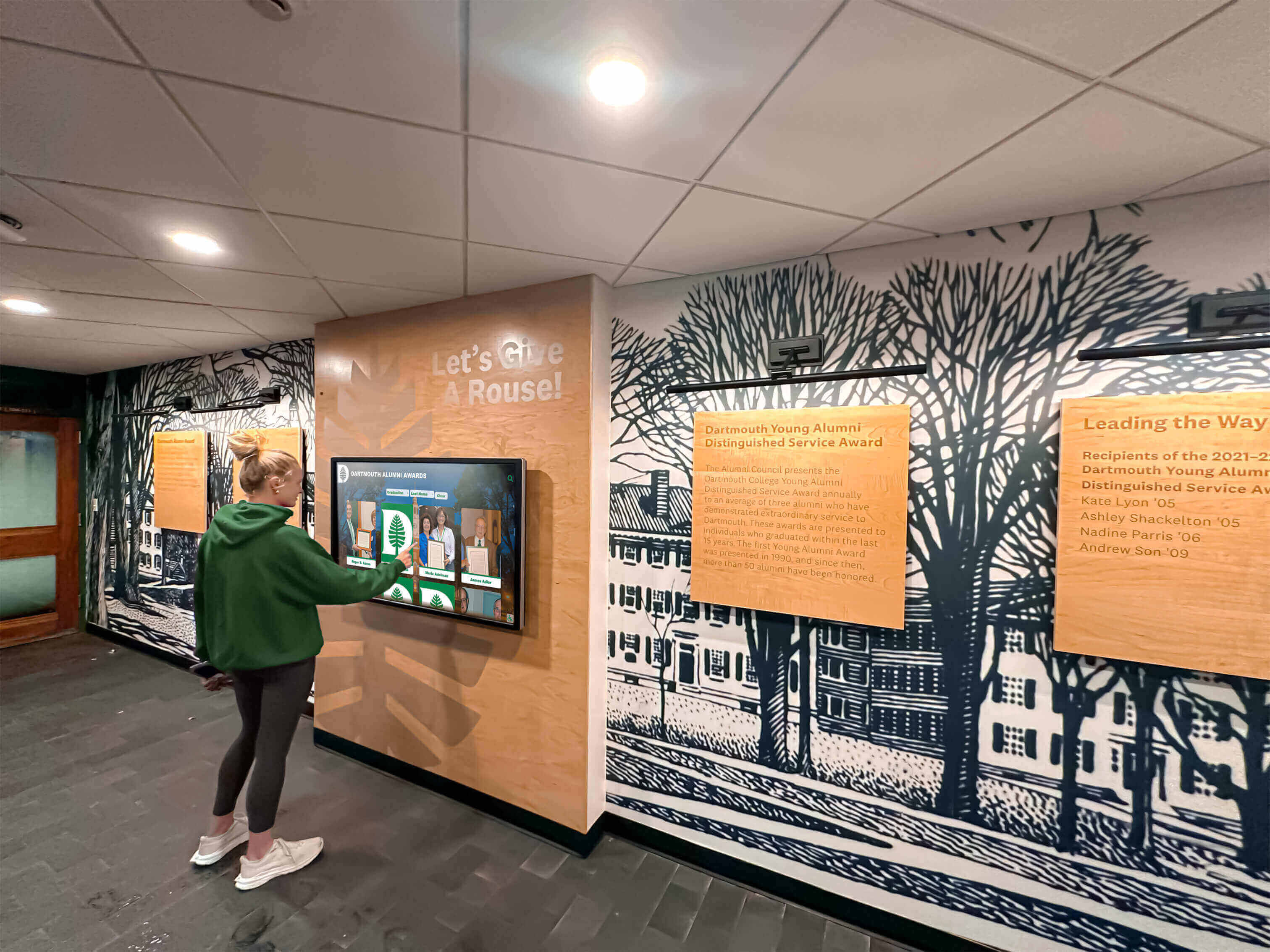
The right touchscreen platform delivers engaging user experiences backed by reliable hardware and accessible content management
Understanding the Three Critical Evaluation Dimensions
Before comparing specific platforms, understanding the distinct evaluation criteria helps schools assess capabilities that directly impact both initial implementation success and long-term operational satisfaction.
Display Quality: The Foundation of Visual Impact
Display quality encompasses hardware specifications, screen technology, and physical installation factors that determine how recognition content appears to viewers:
Hardware Specifications
- Screen size compatibility: Available display sizes from compact 43" screens to impressive 86" installations
- Resolution standards: 4K Ultra HD (3840 × 2160) versus standard HD (1920 × 1080) affecting image clarity
- Brightness ratings: Measured in nits, determining visibility in varying ambient light conditions
- Touch technology: Capacitive versus infrared touch sensing affecting responsiveness and durability
- Commercial-grade components: Screens rated for continuous 16-24 hour daily operation versus consumer displays
- Viewing angles: Screen technology maintaining color accuracy when viewed from side positions
Visual Performance Factors
- Anti-glare coatings reducing reflections in naturally-lit hallways and lobbies
- Color accuracy and saturation presenting photos and videos with lifelike quality
- Contrast ratios affecting text legibility and overall visual depth
- Response time for touch interactions creating fluid, lag-free experiences
Physical Installation Quality
- Professional mounting options including wall-mounted, kiosk-style, and custom enclosures
- Cable management solutions maintaining clean, professional installations
- Ventilation and cooling preventing overheating during continuous operation
- Protective glass or overlays guarding against vandalism and accidental damage
Schools implementing digital wall of fame displays benefit from understanding how display quality directly impacts the recognition program’s visual presence and community engagement.
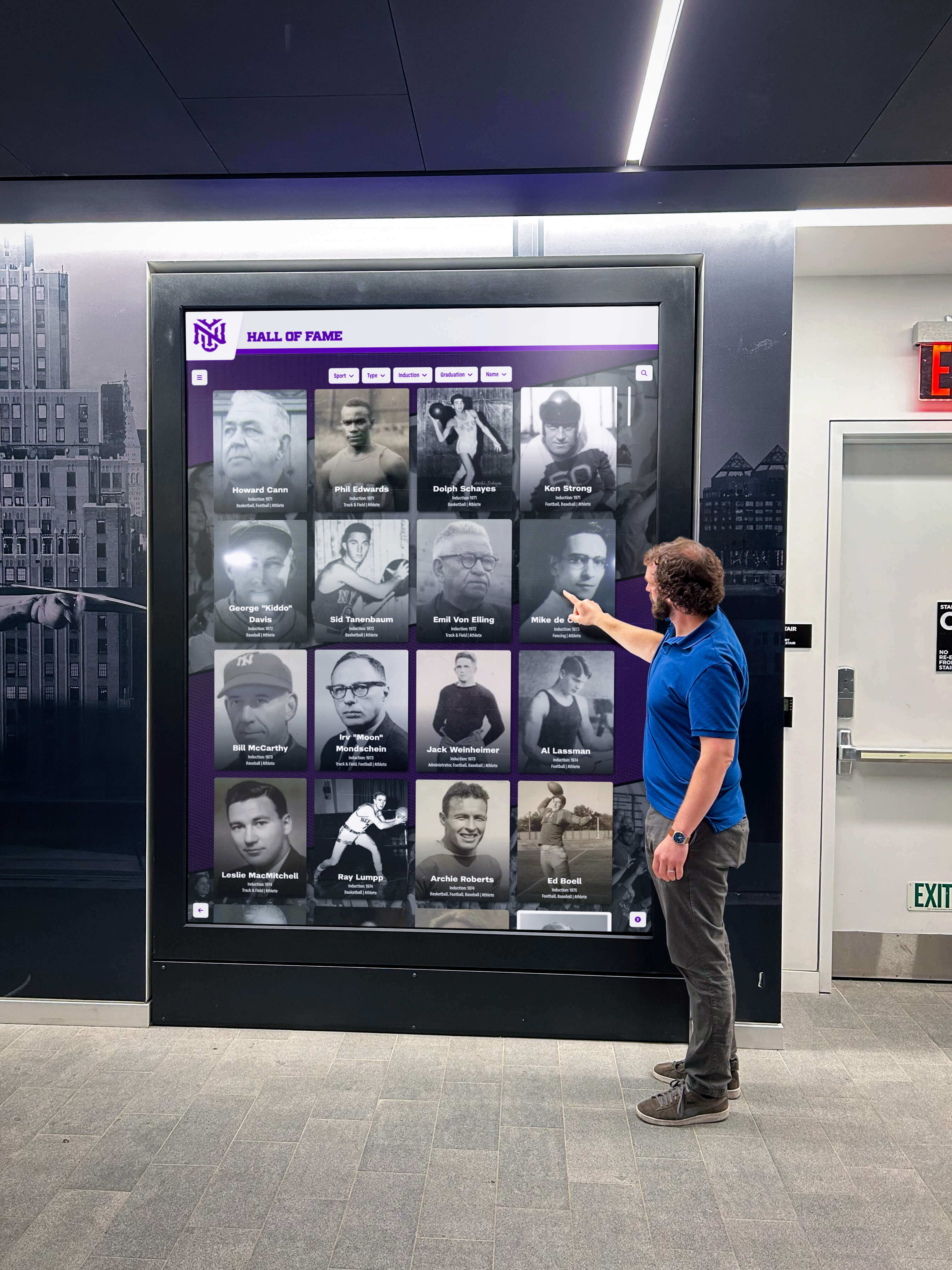
Display quality affects both visual impact and long-term reliability in high-traffic school environments
Software Capabilities: Daily Usability and Feature Depth
Software design determines how easily staff manages content and how effectively visitors explore recognition information:
Content Management System Design
- Administrative interface: Cloud-based web access versus installed software on specific computers
- Learning curve: Time required for staff to become proficient with content updates
- Template availability: Pre-designed layouts for athletics, academics, and donor recognition
- Customization flexibility: Ability to adjust branding, colors, and layout structures
- Bulk import capabilities: Spreadsheet uploads for large historical data sets
- Media support: Photo, video, and document handling with file size limits
Visitor-Facing Interface Features
- Search and filtering: Tools helping visitors find specific individuals and achievements
- Navigation design: Intuitive browsing experiences requiring minimal instruction
- Auto-ranking capabilities: Automatic leaderboard functionality updating as new records are set
- Mobile access: QR code integration allowing content viewing on personal devices
- ADA compliance: WCAG 2.1 AA accessibility standards ensuring universal access
- Multi-language support: Content presentation in languages serving diverse communities
Operational Efficiency Features
- User permission management: Controlled access for different staff roles and responsibilities
- Content scheduling: Automatic display switching for different times or events
- Analytics and reporting: Usage tracking showing which content engages visitors most
- Multi-location management: District-level oversight of kiosks across multiple campuses
- Version control: Content revision tracking and rollback capabilities
Support Services: Implementation Success and Ongoing Assistance
Support quality determines whether schools successfully launch displays and maintain them confidently without excessive vendor dependence:
Initial Implementation Support
- Planning consultation: Guidance on optimal screen placement and sizing decisions
- Content migration: Assistance transferring historical data from existing systems
- Design services: Professional layout creation matching school branding
- Installation coordination: Technical oversight ensuring proper hardware setup
- Staff training: On-site or virtual instruction for content administrators
- Launch assistance: Support during initial public rollout periods
Ongoing Technical Support
- Response time commitments: How quickly vendors address support requests
- Support channels: Phone, email, chat, and knowledge base availability
- Support hours: Standard business hours versus extended or 24/7 coverage
- Escalation procedures: Processes for handling urgent or complex issues
- Software updates: Frequency of feature improvements and bug fixes
- Hardware warranties: Coverage terms and replacement processes
Long-Term Partnership Elements
- Account management: Dedicated contacts versus general support queues
- User community: Forums or groups connecting customers for shared learning
- Training resources: Documentation, video tutorials, and webinar availability
- Renewal terms: Subscription pricing stability and multi-year discount options
- Exit procedures: Data export capabilities if switching to different platforms
Schools developing comprehensive alumni engagement strategies recognize that effective vendor partnerships extend beyond software purchases to ongoing collaboration supporting recognition program goals.
Detailed Platform Comparison: Six Leading School Touchscreen Solutions
Rocket Alumni Solutions: Recognition-Focused Educational Platform
Display Quality Assessment
Rocket Alumni Solutions partners with commercial-grade display manufacturers offering screen sizes from 55" to 86" with 4K Ultra HD resolution standard across all models. Displays feature commercial-grade panels rated for 16-hours-per-day continuous operation with brightness levels exceeding 350 nits, ensuring visibility even in naturally-lit school hallways and lobbies.
The platform supports both wall-mounted installations and freestanding kiosk enclosures. Capacitive touch technology delivers responsive interaction comparable to tablet experiences. Anti-glare coatings reduce reflections, while wide viewing angles maintain color accuracy for visitors viewing displays from various positions.
Strengths:
- Professional-grade hardware specifically selected for educational environments
- Multiple screen size options accommodating different space configurations
- Kiosk and wall-mount flexibility matching various architectural contexts
- High brightness levels maintaining visibility in challenging lighting conditions
Considerations:
- Hardware sold as integrated packages rather than software-only licensing
- Screen options limited to manufacturer partnerships versus universal hardware compatibility
Software Capabilities Assessment
The cloud-based content management system provides intuitive interfaces designed specifically for athletic directors, development officers, and administrative staff without technical backgrounds. Pre-built templates for athletic halls of fame, academic honor rolls, and donor recognition walls eliminate design complexity while allowing customization of school colors, logos, and branding elements.
Unlimited profile capacity supports growing recognition programs without content restrictions. Advanced filtering enables visitors to explore achievements by sport, year, category, or name. Automatic leaderboard functionality updates record boards as new performances are added. QR code generation allows students to share profiles on mobile devices, extending engagement beyond physical displays.
The platform meets ADA WCAG 2.1 AA accessibility standards, ensuring compliance with federal requirements. Multi-device access enables content viewing on smartphones, tablets, and computers, not just the primary touchscreen display.
Strengths:
- Purpose-built for educational recognition applications reducing setup time
- Unlimited content capacity supporting decades of historical data
- Auto-ranking record boards eliminating manual leaderboard updates
- Strong accessibility compliance meeting federal standards
- Mobile access through QR codes extending content reach
Considerations:
- Focused specifically on recognition applications rather than general digital signage
- Template-based approach may feel restrictive for schools desiring complete design freedom
Schools exploring academic recognition programs benefit from software specifically designed for showcasing student achievements rather than adapting general-purpose platforms to recognition contexts.
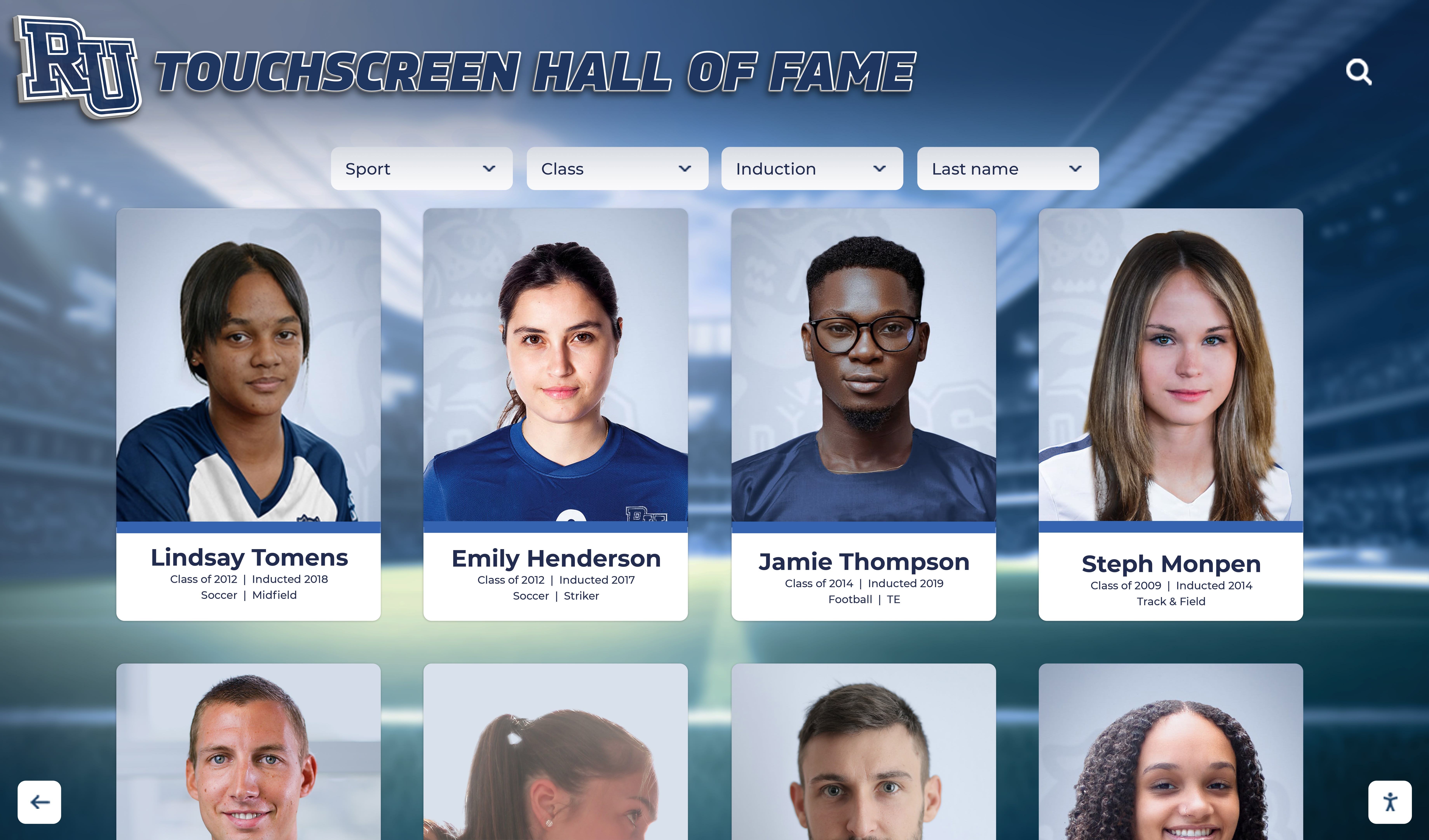
Recognition-focused software optimizes interfaces for exploring biographical profiles and achievement histories
Support Services Assessment
Rocket Alumni Solutions provides initial planning consultations helping schools determine optimal display locations and sizes based on traffic patterns and available wall space. Design services create custom branded layouts incorporating school colors and visual identity elements. Content migration assistance helps transfer historical data from existing systems or spreadsheets.
Staff training includes both virtual sessions and on-site instruction for administrative personnel. Ongoing support operates through phone, email, and chat channels during business hours with typical response times under 4 hours for non-emergency requests. Software updates occur regularly without additional fees, adding new features and improving existing functionality.
The platform offers one-time software licensing rather than recurring subscriptions, reducing long-term operational costs. Multi-year maintenance packages provide predictable budgeting for ongoing support and feature updates.
Strengths:
- Comprehensive initial setup assistance reducing implementation challenges
- Professional design services creating polished, branded displays
- One-time licensing model avoiding perpetual subscription costs
- Regular software improvements included without upgrade fees
- Responsive support during standard business hours
Considerations:
- Support primarily during business hours rather than 24/7 coverage
- Design services may extend initial implementation timelines
Best For: Schools prioritizing long-term recognition displays for athletics, academics, and donor appreciation where content stability matters more than daily rotation, and where one-time investment models align better with capital budgets than ongoing subscriptions.
ScreenCloud: Flexible Digital Signage Platform
Display Quality Assessment
ScreenCloud operates as software-only solution compatible with virtually any commercial display or smart TV, providing hardware flexibility but placing screen selection responsibility entirely on schools. This approach allows institutions to source displays from preferred vendors or use existing screens, but removes quality guarantees associated with integrated hardware-software packages.
Display quality depends entirely on school hardware choices. The software supports various screen sizes and resolutions but provides no specific recommendations or partnerships ensuring educational-appropriate specifications. Schools must independently research commercial-grade options, evaluate brightness requirements, and select touch overlays if interactive functionality is desired.
Strengths:
- Universal hardware compatibility using any display with HDMI input
- Flexibility to select screens matching specific budget constraints
- Ability to repurpose existing displays reducing initial costs
Considerations:
- No guided hardware selection assistance
- Display quality entirely dependent on school procurement decisions
- Touch functionality requires separate overlay purchases and integration
Software Capabilities Assessment
ScreenCloud provides general-purpose digital signage software supporting diverse content types including images, videos, websites, social media feeds, and third-party app integrations. The web-based interface allows content management from any internet-connected device.
Template libraries offer starting points for common school applications, but recognition-specific features like biographical profiles, achievement filtering, and auto-ranking leaderboards are absent. Schools creating hall of fame displays must design custom layouts and manually organize content without purpose-built recognition tools.
The platform excels at content rotation and scheduling, making it effective for announcements, event promotions, and general digital signage, but less optimized for static recognition displays where visitors browse biographical information.
Strengths:
- Extremely flexible content type support
- Strong scheduling and playlist capabilities
- Integration with various third-party apps and services
- Cloud-based management accessible from anywhere
Considerations:
- No recognition-specific templates or features
- Requires significant customization for hall of fame applications
- Learning curve for advanced design customization
Support Services Assessment
ScreenCloud offers tiered support based on subscription level. Basic plans include email support with documentation and video tutorials. Higher tiers add chat support and phone assistance. Response times vary by plan level, with priority support reserved for premium subscriptions.
The platform provides extensive self-service resources including knowledge bases, community forums, and tutorial videos. Implementation guidance is primarily self-directed through these resources rather than personalized consultation services.
Strengths:
- Extensive self-service documentation
- Active user community for peer support
- Multiple support channels on higher-tier plans
Considerations:
- Limited personalized implementation assistance
- Support quality dependent on subscription tier
- Primarily self-guided setup process
Best For: Schools needing versatile digital signage across multiple applications where content changes frequently, and where staff have time and interest to design custom recognition interfaces rather than using pre-built templates.
Rise Vision: Free Digital Signage for Education
Display Quality Assessment
Rise Vision, like ScreenCloud, provides software without hardware, requiring schools to source displays independently. The platform specifically targets educational institutions and nonprofits with free software access, making it budget-friendly but offering no display procurement guidance or quality assurance.
Schools using Rise Vision must research appropriate commercial displays, evaluate specifications, and coordinate purchases through separate vendors. The free software model provides budget flexibility for hardware investment but eliminates the guided procurement process offered by integrated solutions.
Strengths:
- Zero software cost allowing budget allocation toward quality displays
- Compatible with any commercial display or smart screen
- No vendor lock-in for hardware selections
Considerations:
- Complete absence of hardware guidance or recommendations
- Schools responsible for all display research and procurement
- No touch interaction support without additional hardware purchases
Software Capabilities Assessment
Rise Vision offers basic digital signage functionality appropriate for announcements, schedules, and rotating content. The free platform provides templates designed for educational contexts and integrates with Google Workspace tools popular in schools.
Recognition program support is minimal. The platform lacks biographical profile templates, achievement databases, search functionality, and other features purpose-built for halls of fame. Schools creating recognition displays must build interfaces from scratch using basic design tools.
Content management requires technical comfort with HTML and CSS for advanced customization. While simpler than professional web development, creating polished recognition interfaces demands more technical skill than purpose-built recognition platforms.
Strengths:
- Completely free for educational institutions
- Google Workspace integration for calendar and document content
- Active educational user community
Considerations:
- No recognition-specific features or templates
- Significant technical requirements for custom interface development
- Limited professional design polish without coding expertise
Support Services Assessment
As a free platform, Rise Vision provides support primarily through community forums, documentation, and video tutorials. Direct vendor support is minimal, with users relying heavily on community assistance for troubleshooting and implementation guidance.
The absence of paid support means schools must independently resolve technical challenges or hire external consultants for complex customizations. This model works well for technically capable staff but can frustrate schools lacking internal technical expertise.
Strengths:
- Active user community providing peer support
- Extensive documentation and tutorial resources
- No support costs beyond staff time
Considerations:
- No direct vendor support for troubleshooting
- Implementation challenges resolved independently or through consultants
- Limited guidance for complex customization needs
Best For: Budget-constrained schools comfortable with technical self-sufficiency, focusing primarily on announcements and general signage rather than sophisticated recognition interfaces, and willing to invest staff time instead of vendor fees.
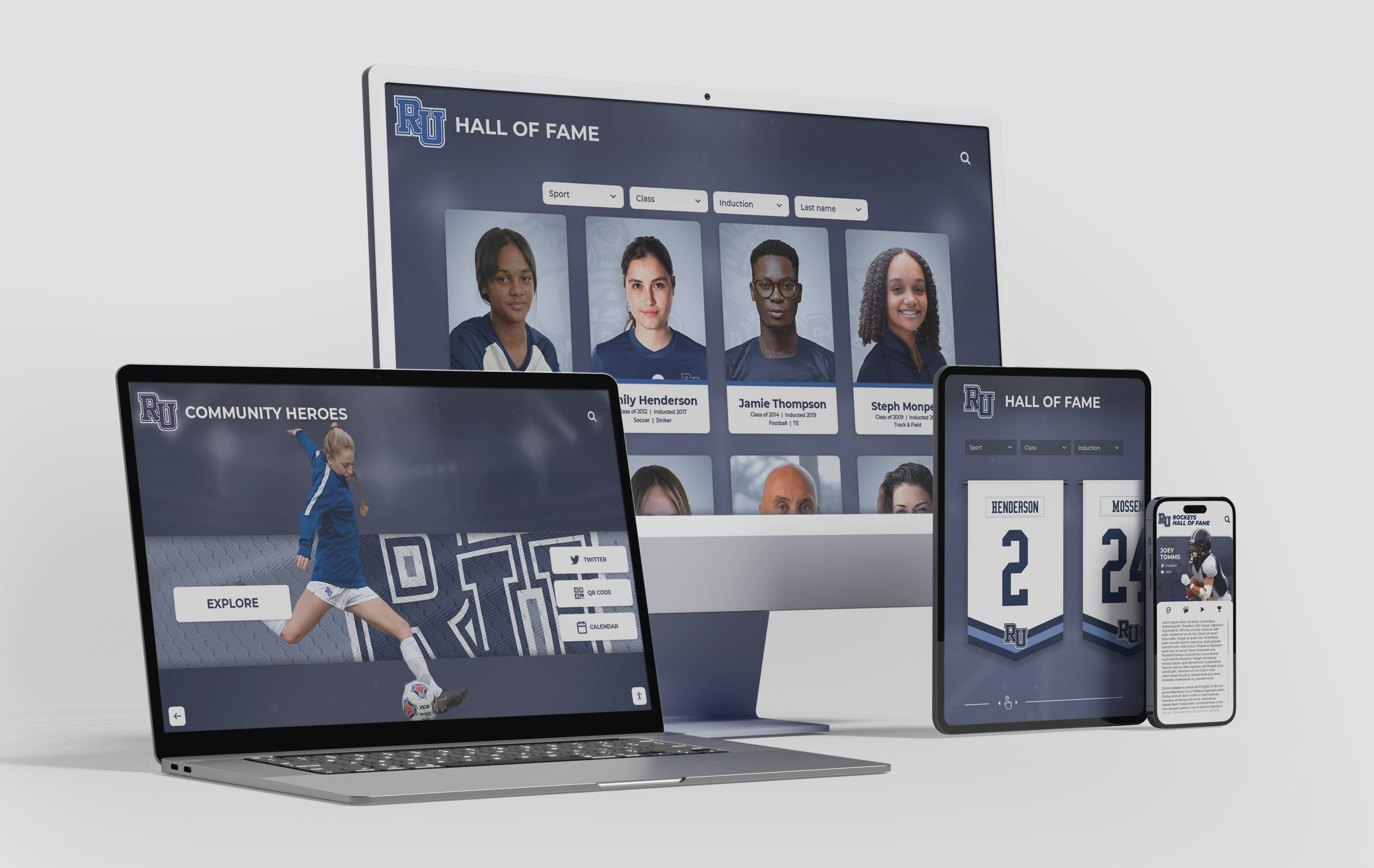
Modern platforms enable recognition content access across multiple devices beyond primary touchscreen displays
Mvix: Enterprise Digital Signage Solution
Display Quality Assessment
Mvix offers both software-only licensing and complete hardware-software packages. Their display partnerships provide commercial-grade screens ranging from 43" to 98" with 4K resolution options. Hardware packages include media players, mounting solutions, and installation coordination.
Commercial displays feature high brightness ratings suitable for various lighting conditions and commercial-grade components designed for continuous operation. Touch overlays are available as add-ons for interactive applications, though the platform primarily focuses on non-interactive digital signage.
Strengths:
- Complete hardware packages available with coordinated installation
- Wide range of screen sizes accommodating diverse space requirements
- Commercial-grade displays rated for continuous operation
- Professional installation services available
Considerations:
- Touch interaction as add-on rather than core functionality
- Higher initial costs for integrated hardware-software packages
- Platform designed primarily for corporate environments rather than schools
Software Capabilities Assessment
Mvix provides robust digital signage software with extensive scheduling, content management, and multi-location control capabilities. The enterprise-focused platform offers sophisticated content organization, user permission management, and analytics.
Recognition-specific features are absent. Creating hall of fame displays requires custom content design using general layout tools. The platform excels at managing rotating content across multiple screens but lacks built-in support for biographical databases, achievement filtering, or visitor search functionality.
Integration capabilities connect with various data sources and third-party systems, enabling schools with technical resources to build custom recognition solutions, though this demands significant development investment.
Strengths:
- Sophisticated scheduling and content rotation capabilities
- Strong multi-location management for districts
- Extensive analytics and reporting features
- Integration options for custom development
Considerations:
- No purpose-built recognition features or templates
- Enterprise complexity may overwhelm small school implementations
- Significant customization required for interactive recognition applications
- Pricing reflects enterprise positioning rather than educational budgets
Support Services Assessment
Mvix provides tiered support based on subscription levels, with premium packages including dedicated account management, priority response times, and extended support hours. Implementation services coordinate hardware installation and initial software setup.
Training resources include live webinars, documentation, and tutorial videos. Professional services are available for custom development projects, though these incur additional costs beyond base platform fees.
Strengths:
- Dedicated account management on premium tiers
- Professional installation coordination services
- Extensive training resources and webinar programs
- Priority support for higher subscription levels
Considerations:
- Support quality tied to subscription tier pricing
- Professional services for customization add significant costs
- Enterprise focus may provide more sophistication than schools need
Best For: Large school districts managing digital signage across multiple campuses and locations, primarily focused on announcements and general content rather than specialized recognition applications, with budgets supporting enterprise-level pricing.
Four Winds Interactive: Corporate-Focused Workplace Platform
Display Quality Assessment
Four Winds Interactive primarily serves corporate workplace environments with digital signage solutions designed for offices, conference rooms, and employee communication. The platform supports standard commercial displays but provides limited guidance on educational-specific hardware requirements.
Display compatibility focuses on corporate contexts rather than school hallways and lobbies. While the software functions with educational displays, hardware recommendations and specifications target business environments where lighting, durability, and installation factors differ from educational settings.
Strengths:
- Compatible with various commercial display options
- Support for video walls and multi-screen installations
- High-end visual capabilities for premium displays
Considerations:
- Limited educational environment expertise
- Hardware guidance focused on corporate rather than school contexts
- Premium positioning may exceed educational budget expectations
Software Capabilities Assessment
Four Winds Interactive provides workplace-focused software emphasizing employee communications, room scheduling, wayfinding, and corporate announcements. Features target business environments rather than educational recognition needs.
Recognition capabilities are minimal to absent. The platform lacks templates, features, or workflows designed for athletic halls of fame, academic honor rolls, or donor recognition. Schools would need extensive customization to adapt workplace communication tools to recognition display purposes.
Integration with Microsoft 365, workplace calendaring, and corporate directories serves business environments but offers limited value for school recognition programs.
Strengths:
- Sophisticated workplace communication features
- Strong integration with business productivity tools
- Advanced scheduling and room booking capabilities
Considerations:
- Designed for corporate workplaces not educational institutions
- No recognition-specific features or templates
- Business pricing models unfamiliar to school procurement processes
- Limited educational environment expertise
Support Services Assessment
Support services reflect corporate positioning with enterprise-level account management, implementation consulting, and ongoing technical assistance. Response times and service levels target business customers with different expectations than educational institutions.
Training focuses on workplace administrators managing employee communications rather than school staff maintaining recognition displays. Implementation services coordinate corporate rollouts across office locations rather than campus environments.
Strengths:
- Enterprise-level account management
- Professional implementation consulting
- Comprehensive training programs
Considerations:
- Support model designed for corporate IT departments
- Educational-specific guidance limited
- Business-hours support may not align with school event timing needs
Best For: Universities and large educational institutions seeking workplace communication tools for administrative offices and conference facilities, not primary recognition display applications in student-facing environments.
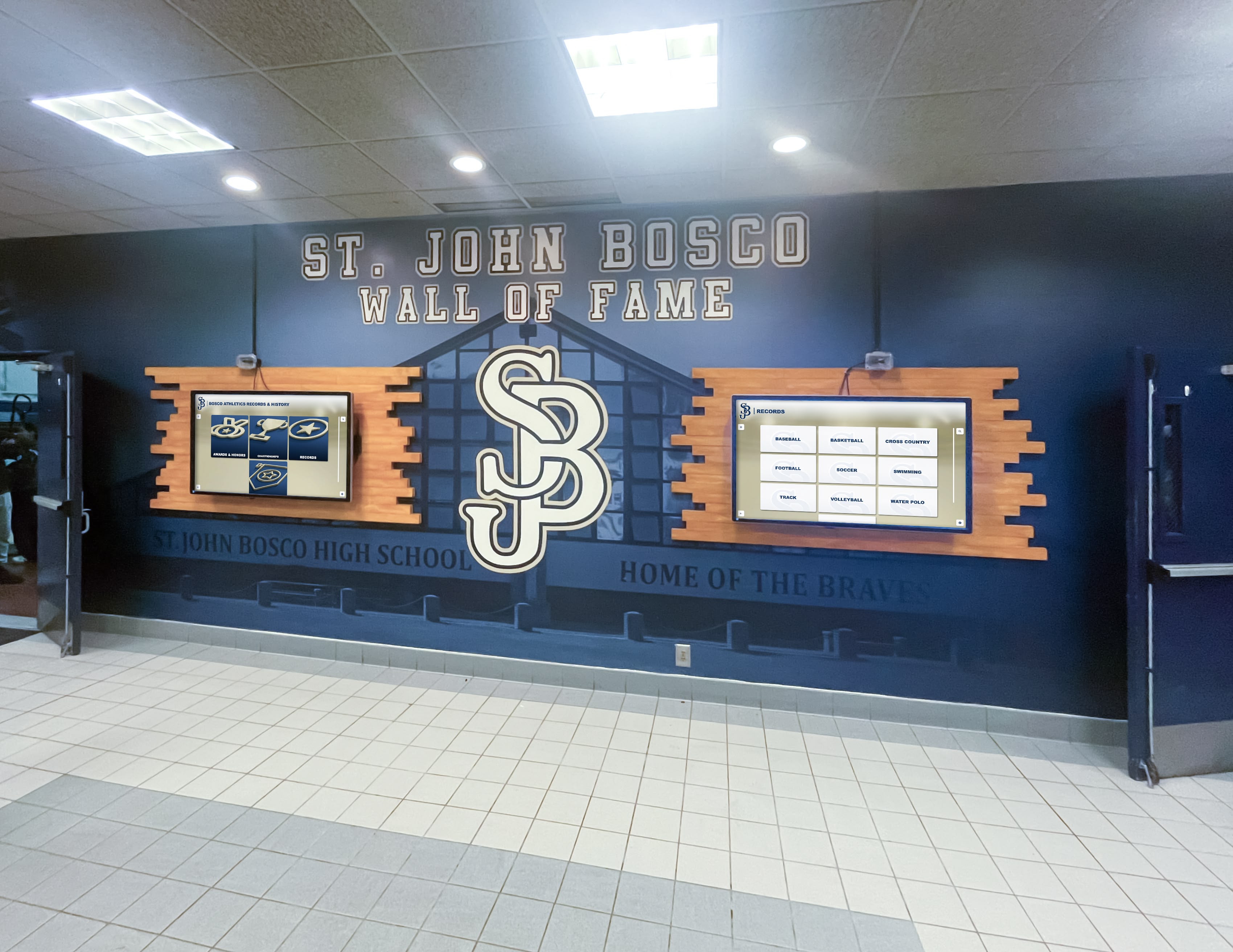
Multi-display installations create comprehensive recognition environments showcasing diverse achievements
NoviSign: Affordable Cloud-Based Digital Signage
Display Quality Assessment
NoviSign operates as software-only platform compatible with various display hardware. The company offers media player devices to coordinate with displays but leaves screen procurement to customers. This approach provides hardware flexibility but minimal guidance on educational-appropriate display specifications.
The platform supports displays from consumer-grade smart TVs to commercial panels, providing budget flexibility but no quality assurance. Schools must independently research brightness requirements, touch capabilities, and commercial-grade specifications appropriate for hallway installations.
Strengths:
- Hardware flexibility accommodating various budget levels
- Compatible with existing displays reducing initial investment
- Media player options for non-smart displays
Considerations:
- No educational hardware guidance or recommendations
- Display quality entirely school-dependent
- Touch functionality requires separate procurement and integration
Software Capabilities Assessment
NoviSign provides straightforward digital signage software with drag-and-drop design tools, content scheduling, and template libraries. The platform emphasizes simplicity and affordability, making it accessible for schools with limited technical resources.
Recognition features are basic. While schools can display photos and text about achievements, the platform lacks database-driven profiles, search functionality, achievement filtering, and other tools optimizing visitor exploration of biographical content. Creating hall of fame displays requires manual content arrangement rather than automated organization.
The simplified approach works well for basic recognition displays showing limited content but becomes cumbersome when managing extensive historical data spanning decades of inductees and achievements.
Strengths:
- Intuitive drag-and-drop design interface
- Affordable pricing competitive with educational budgets
- Simple content scheduling for rotating displays
Considerations:
- No database-driven recognition features
- Limited scalability for extensive historical content
- Manual content organization for large inductee lists
- Basic design capabilities compared to specialized platforms
Organizations planning school award ceremony displays should evaluate whether basic digital signage platforms provide sufficient sophistication for long-term recognition program growth.
Support Services Assessment
NoviSign offers email and chat support during business hours with self-service knowledge base resources. The platform provides tutorial videos and documentation for common tasks and troubleshooting.
Implementation assistance is primarily self-guided through documentation rather than personalized consultation. The affordable pricing model reflects self-service orientation with users independently managing most setup and customization tasks.
Strengths:
- Responsive email and chat support during business hours
- Clear documentation and tutorial resources
- Straightforward troubleshooting procedures
Considerations:
- Limited personalized implementation guidance
- Self-service orientation requiring independent problem-solving
- No dedicated account management or planning consultation
Best For: Schools creating simple recognition displays with limited content, comfortable with self-guided setup, prioritizing budget considerations over advanced features, and willing to manually manage content organization.
Comparison Summary: Key Differentiators Across Platforms
Display Quality Rankings
Highest Quality Integration:
- Rocket Alumni Solutions - Coordinated hardware-software packages with educational specifications
- Mvix - Commercial-grade displays with installation services
- ScreenCloud, Rise Vision, NoviSign (tie) - Software-only requiring independent hardware procurement
- Four Winds Interactive - Corporate focus with limited educational display expertise
Software Sophistication for Recognition
Best Recognition-Specific Features:
- Rocket Alumni Solutions - Purpose-built templates, databases, and visitor interfaces
- Mvix - Customizable but requires significant development investment
- ScreenCloud - Flexible general signage adaptable with extensive customization
- NoviSign - Basic recognition through manual content arrangement
- Rise Vision - Minimal recognition features requiring technical development
- Four Winds Interactive - Workplace communication focus with no recognition optimization
Support Services Comparison
Most Comprehensive Implementation Assistance:
- Rocket Alumni Solutions - Personalized consultation, design services, and content migration
- Mvix - Professional installation and account management on premium tiers
- Four Winds Interactive - Enterprise account management for corporate contexts
- ScreenCloud - Tiered support with premium options
- NoviSign - Self-service orientation with documentation
- Rise Vision - Community-based support without direct vendor assistance
Schools implementing honor roll digital recognition programs benefit from evaluating how platform capabilities align with specific recognition program goals and available staff technical expertise.
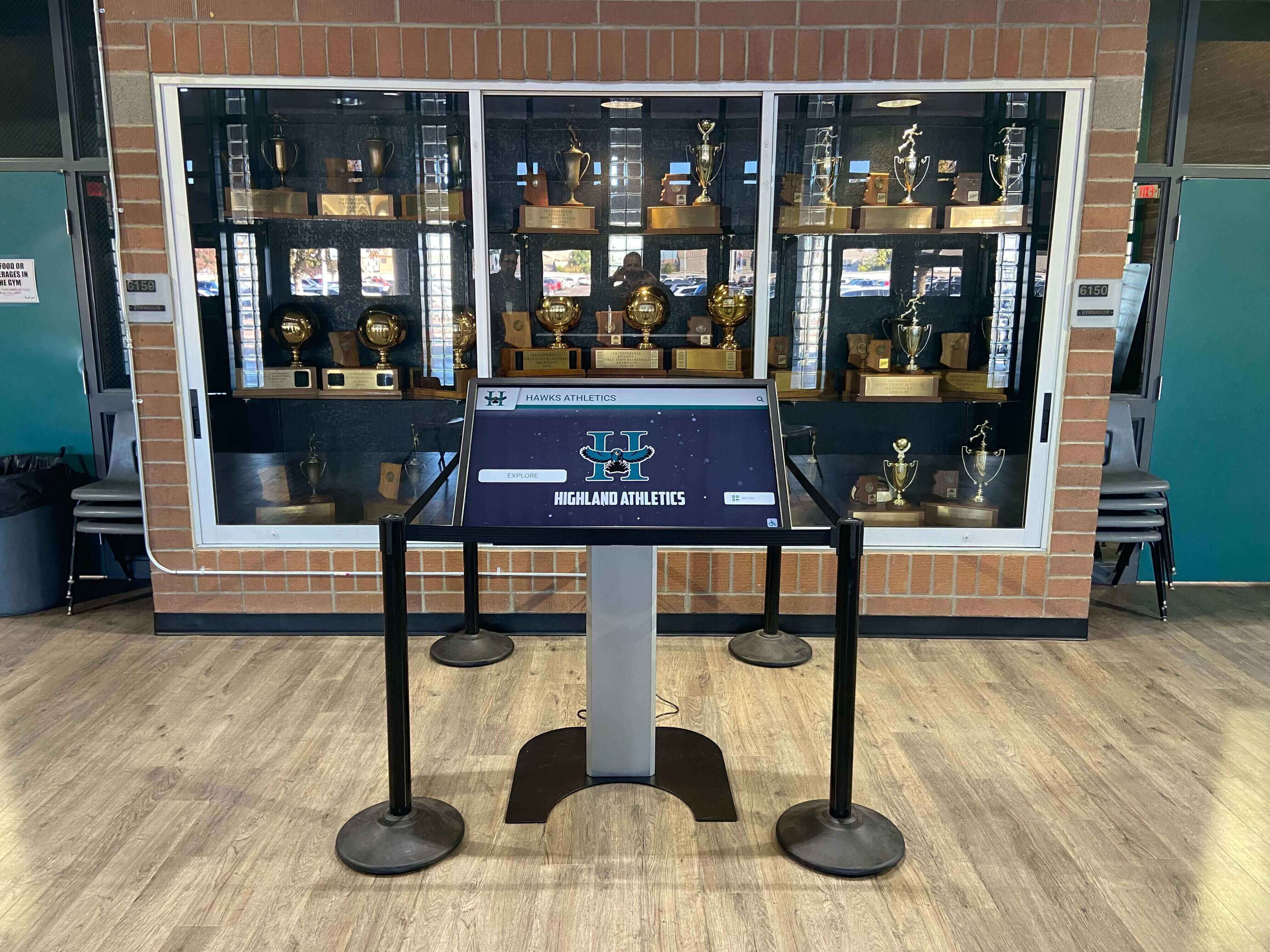
Effective installations integrate touchscreen displays with existing trophy cases and recognition environments
Making the Right Choice for Your School
Selecting the appropriate touchscreen platform requires matching capabilities with your specific recognition program priorities, technical resources, and budget parameters:
Choose Recognition-Focused Platforms (Rocket Alumni Solutions) when:
- Your primary goal is long-term athletic, academic, or donor recognition
- You want pre-built templates and features eliminating custom development
- Staff time for technical customization is limited
- You prefer one-time investment over recurring subscriptions
- Professional design services add value for polished results
- Unlimited content capacity matters for decades of historical data
Choose Flexible Digital Signage (ScreenCloud, Mvix) when:
- You need versatile platforms serving multiple purposes beyond recognition
- Content changes frequently requiring sophisticated scheduling
- You have or can develop technical customization capabilities
- Managing displays across multiple locations and contexts is important
- Integration with various content sources and systems adds value
- Staff comfortable learning sophisticated software interfaces
Choose Budget-Focused Solutions (Rise Vision, NoviSign) when:
- Initial software costs must be minimized or eliminated
- Recognition displays remain relatively simple with limited content
- Technical staff available for customization and troubleshooting
- You’re comfortable with self-guided implementation
- Content organization can be managed manually without database tools
- Basic functionality meets program needs without advanced features
Avoid Corporate-Focused Platforms (Four Winds Interactive) unless:
- Your specific need targets workplace communications in administrative offices
- Educational recognition is secondary to business-style functionality
- Premium pricing aligns with available budgets
- Corporate IT support structures exist within your institution
Consider creating evaluation criteria weighted by your specific priorities. A small school with limited IT resources and focused athletic recognition needs will weight factors differently than a large university managing complex multi-location digital signage networks.
Implementation Considerations Beyond Platform Selection
Successful touchscreen recognition displays require attention to factors extending beyond software capabilities:
Physical Location Planning
- High-traffic areas ensuring maximum visibility and community engagement
- Adequate lighting conditions preventing screen glare and washout
- Accessible placement meeting ADA requirements for wheelchair access
- Electrical infrastructure supporting continuous operation
- Network connectivity enabling content updates and remote management
Content Strategy Development
- Historical data organization and digitization processes
- Photo collection and quality standards for professional presentation
- Ongoing update responsibilities and staff assignment
- Content approval workflows maintaining quality and accuracy
- Growth planning accommodating future inductees and achievements
Schools developing donor stewardship programs recognize that recognition displays succeed through thoughtful content strategy beyond technology platform capabilities.
Staff Training and Change Management
- Administrative personnel content management training
- Technical staff maintenance and troubleshooting instruction
- Creating documentation for institutional knowledge transfer
- Establishing update schedules and responsibility assignments
- Building recognition program promotion into school communications
Budget Planning
- Initial hardware costs for displays, mounts, and infrastructure
- Software licensing or subscription fees (one-time versus recurring)
- Professional services for design, installation, and training
- Ongoing maintenance and support costs
- Content development expenses for professional photography and design
Conclusion: Aligning Platform Capabilities with Recognition Goals
The school touchscreen comparison landscape presents diverse options serving different institutional priorities. Recognition-focused platforms like Rocket Alumni Solutions provide purpose-built features, coordinated hardware, and comprehensive support optimizing athletic, academic, and donor recognition applications. General digital signage platforms offer flexibility for multi-purpose use but demand customization investment for specialized recognition interfaces. Budget-conscious free or low-cost solutions enable schools to minimize software expenses but require technical self-sufficiency and accept functional limitations.
Display quality determines visual impact and longevity—coordinated hardware-software packages ensure appropriate specifications while software-only platforms provide flexibility but demand independent procurement expertise. Software capabilities separate platforms dramatically, with recognition-specific features like biographical databases, auto-ranking leaderboards, and visitor search functionality creating substantially different user experiences than manually-organized content on general signage platforms. Support services influence implementation success and ongoing confidence, with comprehensive consultation and training reducing staff burden while self-service approaches save costs for technically capable institutions.
The right platform aligns with your specific recognition priorities, available technical resources, budget parameters, and long-term program vision. Schools prioritizing sophisticated recognition experiences with professional polish and comprehensive support benefit from purpose-built solutions. Institutions needing versatile multi-purpose platforms serving varied applications gain value from flexible digital signage systems. Budget-constrained schools accepting functional limitations and investing staff time rather than vendor fees find value in free or affordable basic options.
Ultimately, effective school touchscreen recognition displays succeed through thoughtful platform selection matching capabilities with needs, comprehensive implementation planning addressing location and content strategy, and ongoing commitment to maintaining current, engaging content honoring student, alumni, and community achievements throughout generations.
Ready to explore recognition-focused touchscreen solutions designed specifically for schools? Rocket Alumni Solutions provides purpose-built platforms, coordinated display packages, and comprehensive support helping schools create engaging interactive recognition displays celebrating athletic achievements, academic excellence, and community contributions.