Booster clubs handle more sensitive data than most volunteers realize. Every membership form, online payment, donation record, and sponsor agreement adds to a growing pool of personal and financial information that demands thoughtful protection. A clear cybersecurity policy helps booster club boards protect the people who trust them—members, donors, sponsors, and student-athletes—while reducing the risk of financial fraud, data breaches, and unauthorized access to recognition systems.
A booster club cybersecurity policy is a documented set of rules governing how the organization collects, stores, accesses, and shares digital information. It covers everything from password requirements for shared email accounts to who can update a digital hall of fame display. Policies and legal requirements vary by state, school district, and nonprofit status, so this guide is educational rather than legal advice. Work with a qualified attorney or IT professional when formalizing requirements for your specific organization.
This guide connects the practical safeguards booster clubs need—account management, payment security, file sharing, and display access—to the specific types of data booster clubs routinely manage: member rosters, donor records, sponsorship agreements, and athletic recognition archives.
Booster clubs often run lean, with volunteer boards and informal processes built on trust. That trust is an asset, but it can also create gaps that expose sensitive data. Building a simple, enforceable cybersecurity policy does not require dedicated IT staff. It requires clear decisions about who accesses what, how payments are handled, and how data is stored—decisions most booster club boards are already equipped to make.

Digital recognition systems used by booster clubs store athlete profiles, donor acknowledgments, and sponsor displays that require thoughtful access controls
What Data Does Your Booster Club Actually Manage?
Before writing a policy, identify the categories of data your organization collects and where each type lives.
Member and Volunteer Data
Most booster clubs collect:
Contact and Identity Information:
- Member names, email addresses, phone numbers, and home addresses
- Parent and guardian contact details for minors involved in programs
- Volunteer background check records and consent forms
- Committee membership and role assignments
- Emergency contact information for event volunteers
This information often sits in a shared spreadsheet, Google Drive folder, or a membership platform. Each storage location represents a potential vulnerability if access controls are absent.
Financial and Payment Data
Booster clubs process payments through multiple channels:
Common Financial Data Types:
- Online registration and dues payments via payment processors
- Credit and debit card data passing through point-of-sale systems at concession stands
- Bank account information for check signers and ACH transfers
- Expense receipts and vendor invoices
- Annual financial statements and IRS Form 990 filings
- Donor gift records with amounts, dates, and payment methods
Payment card data is governed by the Payment Card Industry Data Security Standard (PCI DSS), a set of requirements most payment processors enforce contractually. Booster clubs rarely store raw card data directly, but policies should document which platforms process payments and confirm those platforms maintain their own compliance certifications.
Donor and Sponsor Records
Donor and sponsor data deserves particular attention because it often includes giving history, correspondence, and acknowledgment letters tied to individuals by name:
Donor Information:
- Full names, contact details, and giving amounts
- Gift dates, payment methods, and fund designations
- Acknowledgment letters and tax receipt copies
- Notes on donor preferences, communications, and relationships
- Pledge agreements and multi-year commitment records
Sponsor Information:
- Business contact names, titles, and email addresses
- Sponsorship agreement documents with terms and amounts
- Logo files and branding guidelines provided for recognition displays
- Invoices, payment confirmations, and renewal reminders
- Display preferences for digital hall of fame and donor recognition panels
Schools and athletic programs that use digital interactive museum displays and recognition walls understand that the data behind those displays—athlete profiles, donor names, sponsor logos—requires the same protection as any other organizational record.
Athletic Recognition and Archive Data
Booster clubs that support or fund athletic recognition programs may manage:
Recognition System Data:
- Student-athlete names, graduation years, sports, and statistics
- Photograph files for hall of fame profiles
- Award categories, selection criteria, and historical records
- Championship team rosters and season results
- Coach and administrator profiles
- Content management system (CMS) credentials for digital display platforms

Digital hall of fame platforms store athlete records and donor acknowledgments that require role-based access controls to maintain accuracy and security
Core Elements of a Booster Club Cybersecurity Policy
A functional cybersecurity policy does not need to be lengthy. It needs to be clear, specific to your tools, and consistently enforced.
1. Account and Password Security
Shared accounts are one of the most common security gaps in volunteer organizations. When multiple people use the same username and password for email, cloud storage, or a donor database, there is no way to audit who accessed what or revoke access when a board member leaves.
Password Policy Requirements:
| Requirement | Recommended Standard |
|---|---|
| Minimum password length | 12 characters or more |
| Complexity | Mix of uppercase, lowercase, numbers, and symbols |
| Reuse | No repeating the previous five passwords |
| Multi-factor authentication (MFA) | Required for email, financial platforms, and CMS |
| Shared account policy | Discouraged; use individual accounts where possible |
| Password manager | Recommended for board use |
Account Access Controls:
- Assign individual accounts to each board member and committee chair
- Document which accounts each person can access and why
- Remove access immediately when a volunteer or board member’s term ends
- Review the account list at the start and end of each school year
- Require password changes after any suspected account compromise
Athletic directors selecting recognition platforms should look for tools that support role-based access, so content editors cannot change administrative settings. Resources on choosing a digital hall of fame provider often address this capability as a key selection criterion.
2. Payment Processing Safeguards
Booster clubs typically do not store credit card numbers directly—payment processors handle that. But policies should still define how payments are accepted, who handles cash, and how reconciliation works.
Payment Security Requirements:
- Use established, PCI-compliant payment platforms rather than collecting card numbers via email or paper forms
- Require two-person cash handling at all in-person events with concession stands or merchandise sales
- Reconcile cash receipts against sales reports immediately after each event
- Restrict access to online payment dashboards to the treasurer and one backup officer
- Never transmit financial account numbers via email or text message
- Document all refunds and their authorizations before processing
- Store financial platform credentials in a password manager, not in shared documents
Point-of-Sale (POS) Considerations:
- Confirm the POS system used for concessions is current on software updates
- Use unique login credentials for each cashier if the platform supports it
- Log out of POS systems between shifts and at the end of events
- Report any terminal that behaves unexpectedly to the vendor immediately
3. File Sharing and Cloud Storage Controls
Many booster clubs use Google Drive, Dropbox, or Microsoft OneDrive to share documents. Without access controls, these folders can become open repositories of sensitive data.
File Sharing Policy:
Permissions to Restrict:
- Donor giving histories visible only to treasurer and president
- Volunteer background check records visible only to designated administrator
- Financial statements and bank records accessible only to officers
- Sponsorship agreements visible only to relevant committee chairs
- Recognition CMS credentials stored in an access-controlled password vault
Permissions That Can Be Broader:
- Event flyers and promotional materials
- Meeting minutes and agendas after board review
- General membership information and newsletters
- Award nomination forms without personal data
- Public-facing recognition content like championship histories
Cloud Storage Best Practices:
- Organize files by sensitivity level—keep sensitive folders separate from general files
- Review sharing settings quarterly and remove links or access no longer needed
- Avoid sharing folders with “anyone with the link” for anything containing personal data
- Use organization-managed accounts rather than personal Gmail or personal Dropbox for official records
- Enable audit logs where available so access history is visible
- Back up critical files to a second location in case of accidental deletion
Schools that host digital recognition displays alongside traditional trophy cases often have supporting documentation spanning decades. Donor walls and school history touchscreens require the same archival discipline—knowing where files live, who can access them, and how they are protected.
4. Display and Kiosk Access Management
When a booster club funds or co-manages a digital hall of fame, touchscreen kiosk, or donor recognition display, it takes on responsibility for the platform’s content management credentials.
Access Tiers for Recognition Displays:
| Role | Access Level | Capabilities |
|---|---|---|
| Platform administrator | Full | Billing, user management, all content |
| Content manager | Editor | Add and edit athlete profiles, photos, records |
| Reviewer | View-only | Approve submissions before publishing |
| Volunteer data entry | Limited | Add specific record types with no deletion rights |
Display Security Policies:
- Document which staff and volunteers have CMS credentials and at what access level
- Use the platform’s role-based access features rather than sharing a single admin login
- Change CMS passwords whenever a content manager transitions out of the role
- Enable MFA on the platform admin account if the platform supports it
- Review published content at least twice per year for accuracy
- Establish a review process before publishing any athlete profile photograph
Academic all-American recognition displays and record boards require careful data governance—the right names, accurate statistics, and verified photos—making access controls essential to data quality as well as security.
5. Volunteer and Board Member Offboarding
Access removal at the end of a term is as important as access provisioning at the beginning.
Offboarding Checklist:
- Remove individual accounts from email platforms and shared drives
- Revoke access to cloud storage folders and organization files
- Change shared passwords the departing member knew, including concession POS systems and streaming accounts
- Transfer any organizational files stored in personal accounts to org-managed storage
- Collect any physical keys, badges, or hardware assigned to the role
- Update the organization’s access log to reflect the change
- Confirm the departing member has no remaining access within 48 hours of their term ending
Protecting Donor and Sponsor Data Specifically
Donors and sponsors extend significant trust to booster clubs by sharing contact information, financial contributions, and business relationships. Mishandling that data—whether through a breach, an accidental email, or improper sharing—damages the relationships that fund the program.

Modern recognition platforms support web and mobile access to hall of fame content, requiring secure credential management for content administrators
Donor Data Minimization
Collect only what you need. Many booster clubs accumulate data because no one has decided what to stop collecting. Review your donor forms and decide:
- Which fields are required for acknowledgment and tax receipt purposes?
- Which fields are optional but helpful for relationship management?
- Which fields are collected by habit but serve no current function?
Remove unnecessary data collection at the form level. Data you never collect cannot be breached.
Donor Communication Security
Common risks in donor communication include:
- Sending donor giving histories to the wrong email address
- Forwarding sponsorship agreements to personal accounts for convenience
- Using unsecured email to request payment details or bank information
- Sharing donor lists with committee members who do not need them
Policy Requirements:
- Never send financial summaries containing individual donor amounts to group distribution lists
- Confirm email addresses before sending any acknowledgment letter with gift amounts
- Use encrypted file transfer or secure portal links—not standard email attachments—for sensitive agreements
- Limit distribution of donor contact lists to board officers and the development committee chair
Sponsor Recognition Data Governance
Sponsor recognition on digital displays requires managing logos, business names, and contact information provided in confidence. Policy should address:
- Where sponsor logo files and branding guidelines are stored and who can access them
- How changes to sponsor recognition are authorized and who can approve display edits
- What happens to sponsor data after a sponsorship period ends—retention versus deletion
- How to handle a sponsor’s request to update or remove their display recognition
Student leadership recognition displays and sponsor acknowledgments follow similar governance patterns—named individuals and organizations appear publicly, and changes require documented authorization from the right role.
Securing Digital Athletic Recognition Systems
Booster clubs that fund or manage digital hall of fame platforms, interactive trophy case systems, or historical record displays take on data stewardship responsibilities that extend beyond the school year.
Why Recognition Platform Security Matters
A digital hall of fame contains personally identifiable information (PII) about current and former student-athletes: full names, graduation years, photos, athletic statistics, and sometimes biographical content. Even when that content is publicly visible, the administrative platform managing it requires strong access controls.
Risks Without Adequate Controls:
- Unauthorized edits introducing inaccurate or inappropriate content
- Former board members retaining access and making changes after leaving the organization
- Admin credentials shared via email and exposed in a phishing attack
- Platform locked to a single admin account whose owner has moved on or graduated
Steps to Secure Your Recognition Platform
- Audit existing accounts. Log into the platform’s admin area and list all active user accounts. Remove any that belong to people no longer with the organization.
- Assign role-appropriate access. Use editor, reviewer, and admin tiers as the platform provides. Not every volunteer needs admin access.
- Enable MFA. Most modern content management systems support authenticator apps or SMS verification. Enable it for admin accounts.
- Document credentials securely. Store admin credentials in a password manager accessible to the president and treasurer—not in a shared Google Doc or email thread.
- Establish a content review process. New athlete submissions should be reviewed by a designated staff member before publishing.
- Create a succession plan. When a board president or technology lead transitions out, credential transfer should be part of the formal offboarding checklist.
Drum major recognition programs and similar student leadership archives face the same succession challenge: recognition content accumulates over years, and the volunteers who built the system eventually move on. A documented credential handoff process keeps the archive intact and the platform secure.
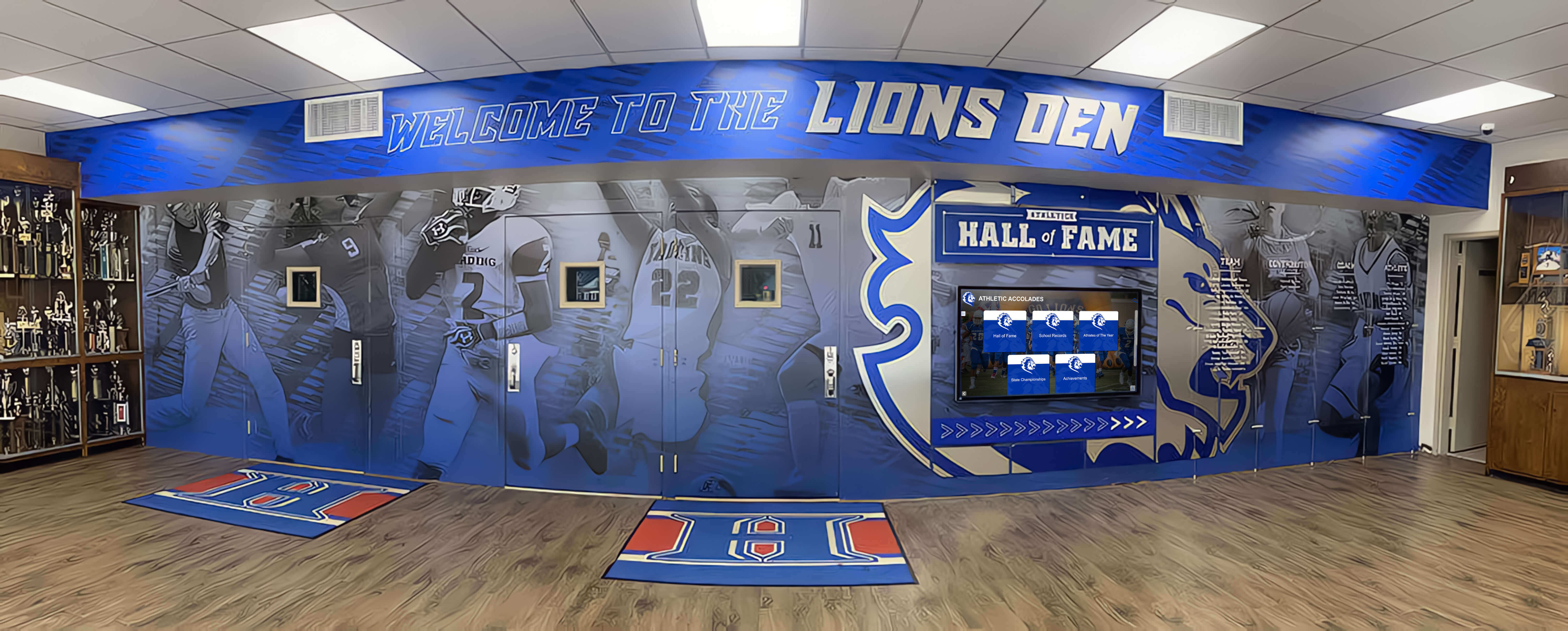
Physical and digital recognition systems both require clear policies for access, updates, and data retention as program leadership changes over time
Building Your Booster Club Cybersecurity Policy: A Step-by-Step Approach
Creating a policy from scratch is more manageable when approached as a series of discrete decisions rather than a monolithic document.
Step 1: Inventory your data and tools. List every platform your booster club uses—email, cloud storage, payment processor, donor database, recognition platform, social media accounts. Note who has access to each.
Step 2: Identify your highest-risk areas. Where does the most sensitive data live? Payment processing and donor records typically represent the highest risk. Prioritize policy development for those areas first.
Step 3: Draft simple, specific rules. Avoid vague language like “handle data carefully.” Write specific requirements such as: “The treasurer and president are the only officers with access to the payment processor dashboard.”
Step 4: Assign accountability to roles, not individuals. Name a board role—not a person—as responsible for each policy area. “The secretary maintains the organization’s access log” is more durable than naming someone who may rotate out.
Step 5: Review annually. Set a policy review date at the start of each school year, coinciding with board transitions. Update the access log and confirm all account lists are current before new officers take their seats.
Step 6: Train new board members. Include cybersecurity policy orientation in onboarding for all new officers and committee chairs. A one-page summary of key requirements is easier to act on than a full policy document.
Step 7: Document incidents. If a security issue occurs—a lost phone with email access, a compromised account, or an accidental data disclosure—document what happened and what was done to address it. This record improves future policy and demonstrates responsible governance.
Booster Club Data Security: Quick Reference by Data Type
| Data Type | Storage Location | Access Control | Retention Guidance |
|---|---|---|---|
| Member contact lists | Cloud drive, restricted folder | Officers and relevant committee chairs | Review annually; remove inactive members |
| Donor giving histories | Donor management platform or restricted spreadsheet | Treasurer and president only | Retain per nonprofit accounting requirements |
| Sponsor agreements | Secure cloud folder | President, treasurer, and relevant committee chair | Retain through sponsorship period plus applicable legal minimum |
| Payment processor dashboard | Payment platform | Treasurer and backup officer | Platform-managed; follow processor’s retention rules |
| Recognition CMS credentials | Password manager | President and CMS administrator | Update at each board transition |
| Volunteer background checks | Restricted cloud folder or secure filing | Designated administrator only | Follow school district or state retention requirements |
| Athlete photos and profiles | Recognition platform CMS | Content manager role only | Retain per athletic department and school records policy |
Retention schedules and legal requirements vary by state, school district, and nonprofit type. Consult an attorney or accountant familiar with nonprofit law in your jurisdiction.
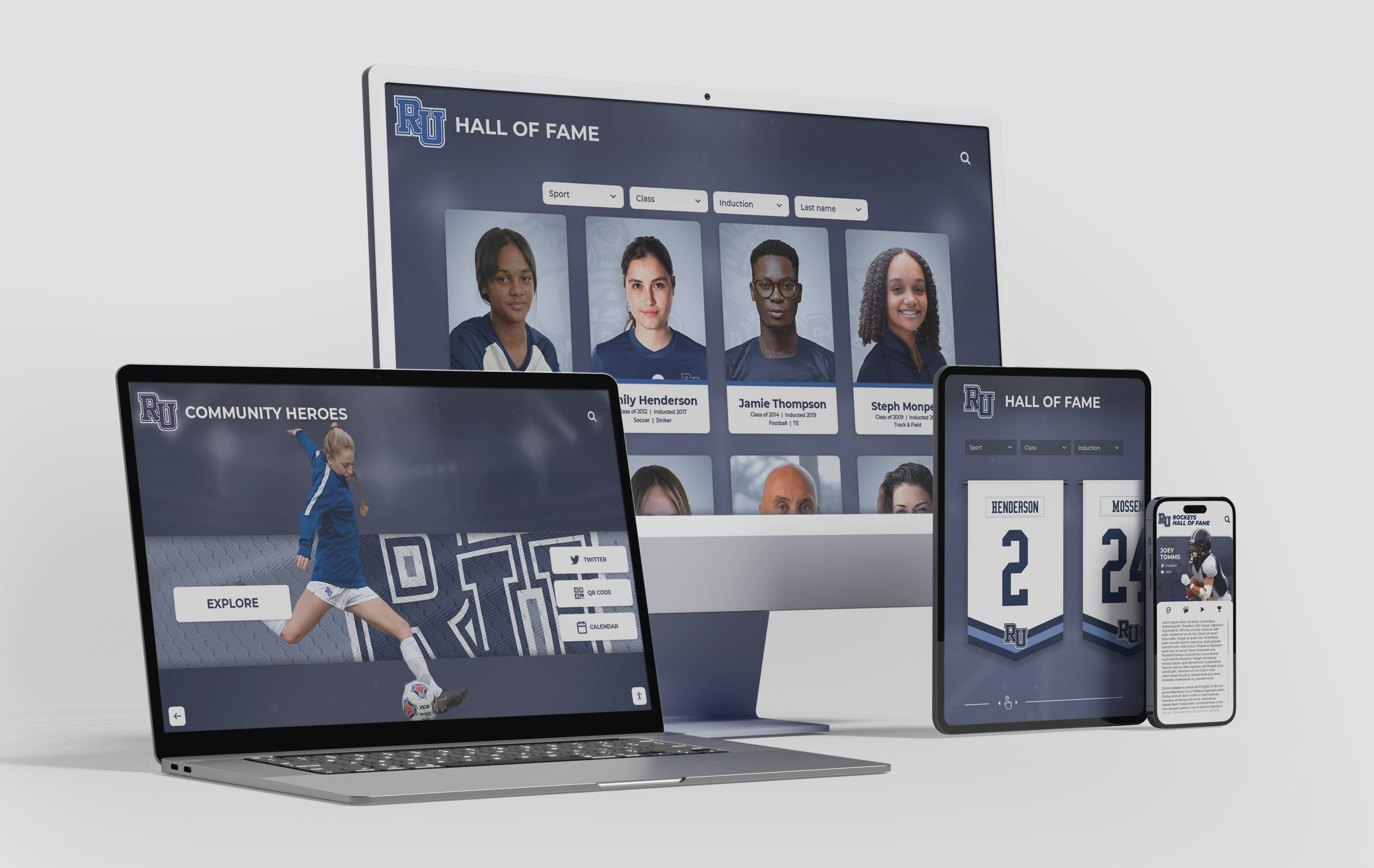
Recognition platforms accessible on multiple devices require strong credential management and role-based access controls to protect athlete and donor data across every access point
Cybersecurity Policy and the Broader Recognition Picture
Data security and athletic recognition connect more directly than most booster clubs initially expect. The same digital platform that displays a hall of fame inductee’s photo and career statistics also stores the credentials used to update it. The same donor wall that acknowledges a naming gift also contains that donor’s contact information. The same online payment system that collects membership dues processes the donations funding new display installations.
Schools that invest in digital hall of fame platforms increasingly expect booster club partners to maintain clear records of who manages content and how credentials are protected. Athletic directors and administrators want assurance that platforms recognizing decades of student-athlete achievement are managed with care—not left open to any former volunteer with a saved password.
When booster clubs treat cybersecurity as part of responsible governance rather than a technical burden, they build the trust that keeps donors giving, sponsors renewing, and community members engaging with recognition programs year after year.
Exploring digital recognition options for your athletic program? Request a demo from Rocket Alumni Solutions to see how role-based access controls, cloud-based content management, and secure multi-device display systems can support responsible data stewardship for booster clubs and athletic departments.
Frequently Asked Questions: Booster Club Cybersecurity Policy
What is a booster club cybersecurity policy?
A booster club cybersecurity policy is a written document that defines how the organization protects digital information—member contact records, donor giving histories, sponsor agreements, payment data, and recognition system content. It specifies who can access which systems, how credentials are managed, how sensitive files are stored, and what steps to take when a security incident occurs.
Does a small booster club need a formal cybersecurity policy?
Size does not reduce risk. Smaller clubs may actually face greater exposure because informal processes and shared accounts are more common. Even a one-page document covering password requirements, account access rules, and payment handling procedures provides meaningful protection and demonstrates responsible governance to members and donors.
What payment security rules apply to booster clubs?
Booster clubs that accept credit or debit card payments are bound by their payment processor’s terms of service, which typically incorporate PCI DSS requirements. These require using approved payment platforms, avoiding storage of raw card data, and maintaining current software on point-of-sale systems. Requirements vary by processor and payment volume. Consult your processor’s documentation and, if needed, a qualified security professional.
How should booster clubs handle data breaches or security incidents?
Policies and legal obligations around breach notification vary by state and the type of data involved. Common steps include: containing the breach by revoking compromised credentials, identifying what data was affected, notifying affected individuals if required by applicable law, documenting the incident, and reviewing the policies that allowed the breach. Organizations should consult legal counsel when developing incident response procedures. This post does not constitute legal advice.
Who should own the cybersecurity policy within a booster club?
Ownership is typically assigned to the president or a designated technology officer where one exists. Day-to-day enforcement of specific rules—maintaining the access log, managing CMS credentials, overseeing file storage—can be distributed to the treasurer, secretary, or relevant committee chairs. The key is assigning responsibility to named board roles rather than individuals, so accountability survives annual leadership transitions.
How often should a booster club review its cybersecurity policy?
Annual review aligned with the board transition cycle is the minimum. Review the access log, confirm all platform accounts are current, remove departing members’ credentials, and onboard incoming members. Trigger an additional review whenever the organization adopts a new platform, experiences a security incident, or a board member with broad system access leaves unexpectedly mid-year.
How does cybersecurity policy relate to digital hall of fame management?
Digital hall of fame and recognition platforms store personally identifiable information about current and former student-athletes, as well as donor and sponsor records. The platform’s content management system requires the same credential governance as any other sensitive system—individual accounts where possible, MFA on admin roles, prompt offboarding, and a documented succession plan so credentials transfer cleanly at each leadership transition.