Intent: compare. Purchasing the best digital signage for schools looks straightforward until athletic departments get involved—because recognition, records, hall of fame profiles, and sponsor panels demand capabilities that standard announcement software rarely includes.
School administrators evaluating digital displays tend to start with a broad platform search: which software runs the most screens, fits the budget, and handles emergency alerts. That framework works well for hallway announcements and cafeteria menus. It works less well the moment an athletic director asks whether the system can automatically re-rank track records when a sophomore breaks the 100-meter mark from 1987, or whether the donors who funded the field house renovation can appear alongside the sports championships those dollars made possible.
Athletic recognition requirements are specific enough that buying a general-purpose digital signage platform and retrofitting it to athletic recognition needs creates ongoing administrative friction. This guide compares the recognition-specific features that matter most—record boards, hall of fame displays, schedules, sponsor panels, CMS workflows, and mobile access—so purchasing teams can evaluate options with athletic department needs at the center of the decision rather than as an afterthought.
The best digital signage for schools meets the full range of institutional communication needs. For athletic departments specifically, that means the software must do things that no bulletin-board replacement was designed to do: display competitive records across dozens of events, honor inductees with biographical depth, integrate sponsor recognition without manual workarounds, and remain updatable by coaches and administrative assistants who are not content technology specialists.
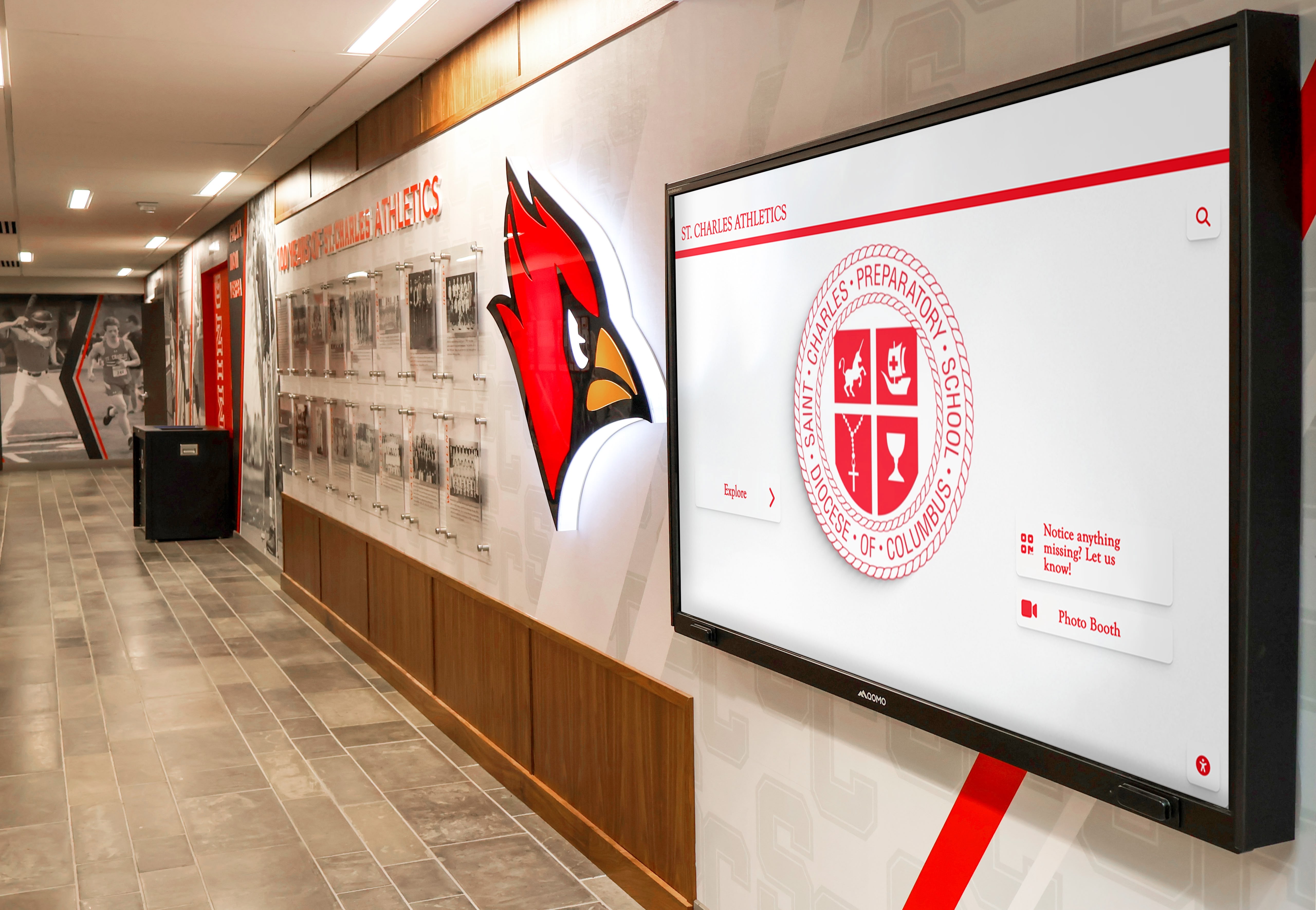
Purpose-built digital signage in school athletic hallways integrates mascot identity, recognition content, and schedule information in a format staff can update without technical assistance
Why Athletic Recognition Requires More Than General Digital Signage
General-purpose digital signage platforms excel at a specific problem: getting content onto screens quickly, scheduling announcements, and managing multiple displays from a central dashboard. Schools using these platforms for lunch menus, bell schedules, and event promotions typically report high satisfaction because the software matches the task.
Athletic recognition is a different task. The content model for general signage—create a slide, schedule it, display it—doesn’t map cleanly onto recognition workflows where athlete profiles accumulate over decades, records need structured ranking logic, and hall of fame displays require searchable databases rather than rotating slideshows.
Comprehensive guides to digital signage software for schools in 2026 address this distinction in detail—comparing platforms across both general communication and specialized recognition use cases. Understanding where general signage ends and recognition software begins helps athletic departments avoid purchasing systems that look adequate in demonstrations but create operational bottlenecks once configured for recognition content.
The Two Platform Categories Schools Are Choosing Between
Schools evaluating digital displays for athletic spaces typically encounter two distinct platform types:
General-purpose digital signage platforms are designed for broad communication use across industries. In education, they handle cafeteria menus, wayfinding, event calendars, emergency alerts, and announcement scheduling. Most offer template libraries, cloud-based content management, and network support for multiple screens. Some include basic media players capable of displaying photos and videos. They are not designed for athletic record databases, inductee profile structures, or recognition-specific navigation.
Purpose-built athletic recognition platforms are designed specifically for the recognition problem. They include data models for athlete profiles, competitive records organized by sport and event, induction categories, championship histories, sponsor recognition panels, and administrative tools for managing recognition content year-round. The best versions include touchscreen interaction, QR code access, and multi-device compatibility that extends recognition beyond the physical display.
Rocket Alumni Solutions occupies this second category—a platform purpose-built for the recognition workflows that athletic departments, alumni offices, and advancement teams actually operate. Most schools evaluating digital signage for athletic facilities compare options across both categories before deciding which purchase approach serves their program most effectively.
Feature 1: Athletic Record Board Display and Auto-Ranking
This is the recognition feature most likely to expose the limits of general-purpose digital signage. Athletic record boards require structured data: sport, event, record holder, performance mark, date, and classification (varsity, relay, JV). When a record is broken, that structure needs to update automatically—not require a staff member to manually re-sort a spreadsheet and recreate a graphic.
General-purpose signage approach: Staff create a graphic or slide showing record board content, upload it to the CMS, and schedule it for display. When records change, the graphic must be recreated and reuploaded. There is no native database, no auto-ranking, and no search capability. If the program tracks records for twelve sports across multiple event categories, maintaining accuracy requires ongoing manual effort.
Purpose-built approach (Rocket Alumni Solutions): Record data lives in a structured database. When a new record is entered, the system compares it against existing marks and ranks it appropriately—automatically surfacing the new record holder and archiving the previous one. Records remain accurate without manual reordering. Sports with ascending performance values (distances, heights, scores) and those with descending values (race times) can each be configured correctly.
Comparing digital signage options specifically for schools covers record board capabilities in the context of broader school digital signage decisions—a useful reference for teams evaluating whether general-purpose or purpose-built software better matches their athletic department’s record-keeping volume.
Feature 2: Hall of Fame Inductee Profiles and Navigation
A rotating slideshow displaying inductee photographs is not a hall of fame display—it’s a screensaver. Genuine hall of fame digital signage allows visitors to search for specific individuals, filter by sport or graduation year, and explore biographical profiles that include career statistics, honors earned, college destination, and professional notes where relevant.
General-purpose signage approach: Inductee content appears as slides or image galleries. Visitors cannot search, filter, or self-direct their exploration. A school with 200 inductees across 30 years of induction classes must either compress all recognitions into a long slideshow that most visitors won’t sit through, or create separate slides per sport that rotate on a fixed schedule. Neither approach serves the community member who arrived specifically to show a grandchild where their grandfather’s name appears.
Purpose-built approach: Inductee profiles exist as individual database records with structured fields—name, graduation year, sport, honor type, biography, photographs, and associated content. Touchscreen navigation allows visitors to search by name, browse by sport, or filter by induction year. A visitor looking for a specific athlete finds them in seconds rather than waiting through a slideshow rotation.
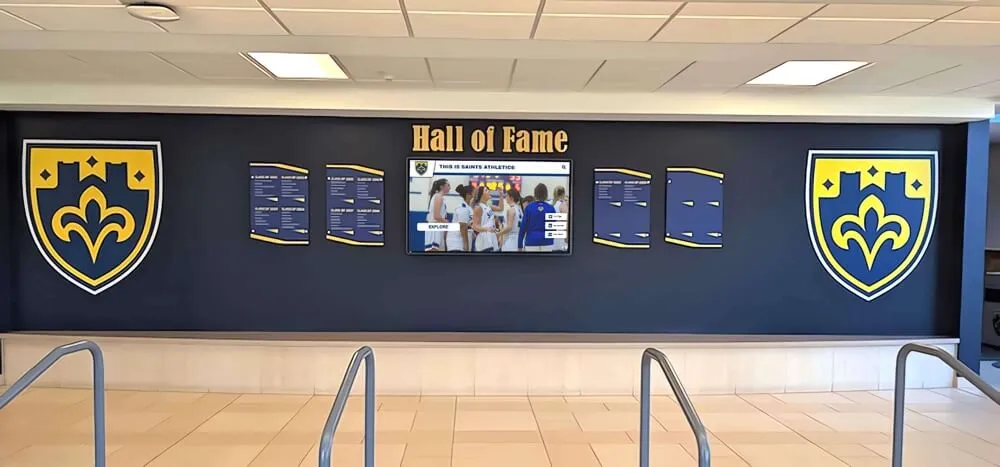
Effective school hall of fame displays pair traditional visual elements with searchable digital systems—visitors find specific inductees rather than waiting for the right slide to appear
The depth of profile information also differs meaningfully. Understanding what makes school hall of fame software platforms worth comparing includes evaluating whether platforms support full biographical content or limit inductee data to a name, photo, and brief caption.
Feature 3: Game Schedules, Season Records, and Team Histories
Athletic departments need displays that communicate upcoming events, current season results, and historical team records. This is where general-purpose digital signage shows its strength—and where the integration question becomes important.
General-purpose signage approach: Schedule displays are handled well. Most platforms support calendar integrations, manual schedule entry, and template-based event promotion. Current season results can be updated manually or pulled from connected data sources. This is the feature category where general-purpose signage genuinely competes.
Purpose-built approach: Schedule and result displays exist within the same platform as recognition content—meaning visitors can move between viewing upcoming games, current season standings, and the historical record of every championship that preceded them. The continuity between current-season communication and historical recognition is the differentiation: one platform serves the full athletic storytelling need rather than requiring separate systems for communication and recognition.
Interactive digital signage kiosks for school lobbies addresses how schools are combining schedules, recognition content, and wayfinding in lobby installations—context for teams designing comprehensive lobby display environments rather than single-purpose screens.
Feature 4: Sponsor and Donor Recognition Panels
Athletic facilities carry sponsor commitments: naming rights agreements, booster club acknowledgment, corporate partnerships, and donor recognition panels tied to capital campaigns or endowment gifts. Digital signage that handles recognition content can also handle sponsor display—but the implementation determines whether it does so gracefully or awkwardly.
General-purpose signage approach: Sponsor logos and acknowledgment slides are added to content rotation. Timing can be scheduled, and sponsors can receive designated screen time. The limitation is context: sponsor slides appear in the same rotation as lunch menus and event announcements, without the recognition framing that institutional donors typically expect.
Purpose-built approach: Sponsor and donor recognition exists within a recognition context. Donors who funded athletic facilities appear alongside the programs those facilities support. Naming rights acknowledgments display in proximity to the sport histories they’re associated with. This contextual coherence matters for donor relations—recognition that appears alongside what it supported communicates institutional appreciation more effectively than a logo in an announcement rotation.
Campus signage practices that support school branding covers how donor recognition integrates with broader campus communication systems—useful reading for advancement staff whose recognition commitments span both athletics and academic programs.
Digital signage strategies for donor recognition provides additional context for teams responsible for meeting recognition commitments to major institutional supporters through digital display programs.
Feature 5: Content Management for Non-Technical Staff
Athletic departments run on tight staffing. The person responsible for updating digital displays is often an administrative assistant, an athletic secretary, or the athletic director themselves—individuals with deep knowledge of athletic programs and limited interest in learning content management software as a secondary skill.
General-purpose signage approach: CMS complexity varies widely. The most capable general-purpose platforms offer intuitive drag-and-drop interfaces appropriate for non-technical users. Others require template configuration, media encoding, and playlist management that creates a learning curve for occasional content contributors. Feature-rich platforms that serve complex multi-campus deployments tend toward complexity that serves IT departments better than athletic offices.
Purpose-built approach: Athletic recognition platforms are typically designed for the athletic administrator profile—someone who knows sports programs deeply, updates content seasonally, and needs to complete routine tasks (adding a new record, uploading an inductee’s photo, adjusting a sponsor panel) without a tutorial. The CMS structure maps to how athletic content is actually organized: by sport, by season, by recognition category.
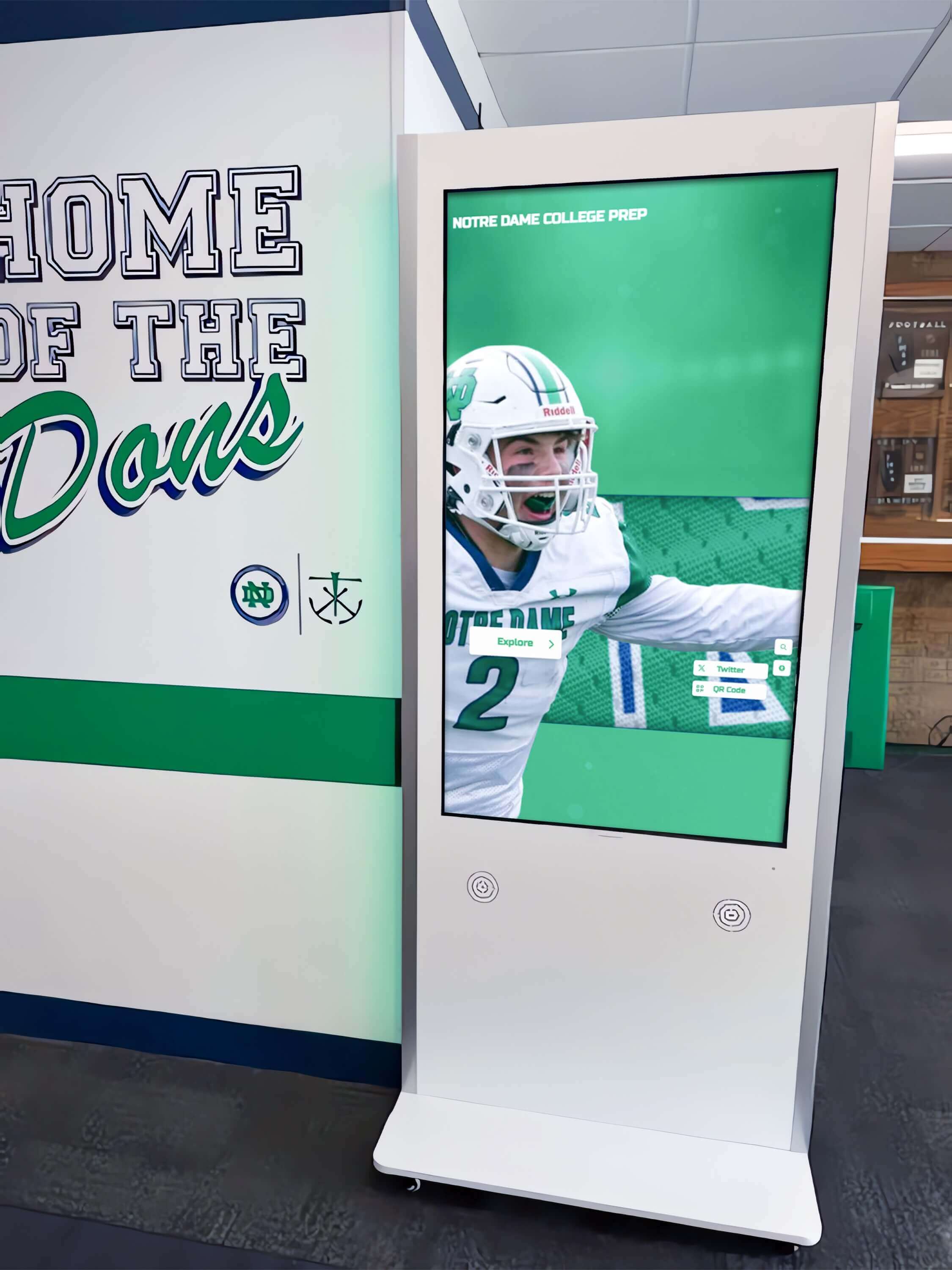
Athletic department staff should be able to update digital recognition content without IT assistance—CMS design determines whether updates take five minutes or five hours
Digital yearbook software platform comparisons offers a parallel lens for evaluating content management tools used by non-technical school staff—the usability considerations that determine whether a platform gets maintained consistently or gradually falls behind.
Feature 6: QR Code Access and Multi-Device Compatibility
Gym lobby displays serve visitors who are physically present at the facility. Alumni traveling for reunion weekends, prospective families attending open houses, and community members who aren’t on campus remain unreached by a display that exists only as a physical installation.
QR code integration—where a code displayed on or near the touchscreen provides mobile access to the same recognition content—extends the reach of the recognition program beyond the building without additional hardware investment. The experience should be equivalent: a visitor scanning the code should be able to browse inductees, search records, and view team histories from a phone exactly as they would from the touchscreen.
What to verify: Confirm that mobile access is included in the standard platform offering rather than an add-on, that the mobile experience reflects real-time content updates (not a cached version from installation day), and that the mobile view is accessible to users relying on screen readers or other assistive technology.
Comparing digital recognition software platforms for yearbooks and archival needs includes coverage of multi-device accessibility considerations—relevant for schools building recognition programs intended to serve alumni communities beyond the physical campus.
Feature 7: ADA and WCAG 2.1 AA Compliance
Schools operating public-facing digital displays are subject to accessibility requirements that apply to both the physical installation and the software interface. For athletic recognition displays, compliance considerations include:
- Mounting height: Operable components should fall within 15–48 inches for wheelchair accessibility per ADA Standards for Accessible Design
- Contrast ratios: Text and background elements must meet WCAG 2.1 AA minimums (4.5:1 for standard text, 3:1 for large text)
- Touch target sizing: Interactive elements require sufficient size for users with limited fine motor control
- Alternative access: QR codes or web-accessible versions ensure users who cannot operate a physical touchscreen can still access recognition content
Request written documentation of accessibility testing from any platform vendor rather than relying on general assurances. Compliance language in marketing materials does not substitute for documented WCAG conformance testing. Schools that have received formal accessibility complaints find that platforms with documented compliance records are significantly easier to defend than those relying on verbal assurances.
Feature 8: Content Capacity and Archive Depth
Recognition programs grow. A school that has operated athletic programs for 40 years has recognition content spanning multiple decades, multiple coaching eras, and potentially thousands of athletes across dozens of sports. The platform purchased today needs to accommodate both current programs and the historical archive.
Questions to ask vendors:
- Is there a per-inductee or per-record fee, or does pricing cover unlimited entries?
- Are there storage caps on photographs and video content, or is media storage included without volume limits?
- Can historical records be attributed to specific seasons and eras, or do they appear as undated entries?
- What happens to content if the school stops using the platform—is data exportable?
Hall of fame software platform evaluations for 2026 covers content capacity considerations across recognition platforms—particularly relevant for established programs with extensive historical archives that would require significant data migration at any future platform change.
Feature 9: Year-Round Update Workflows
Athletic recognition content changes on a predictable cycle: spring induction ceremonies add new hall of fame inductees, fall sports begin generating new records, winter championships produce team history updates, and sponsor acknowledgments require seasonal adjustment as agreements renew or change.
The software that serves an athletic department well is software that fits naturally into these seasonal rhythms rather than requiring special effort to accommodate them. Cloud-based CMS access—available from any browser without on-site hardware access—ensures that the person responsible for content can update from wherever they happen to be when content needs to change.
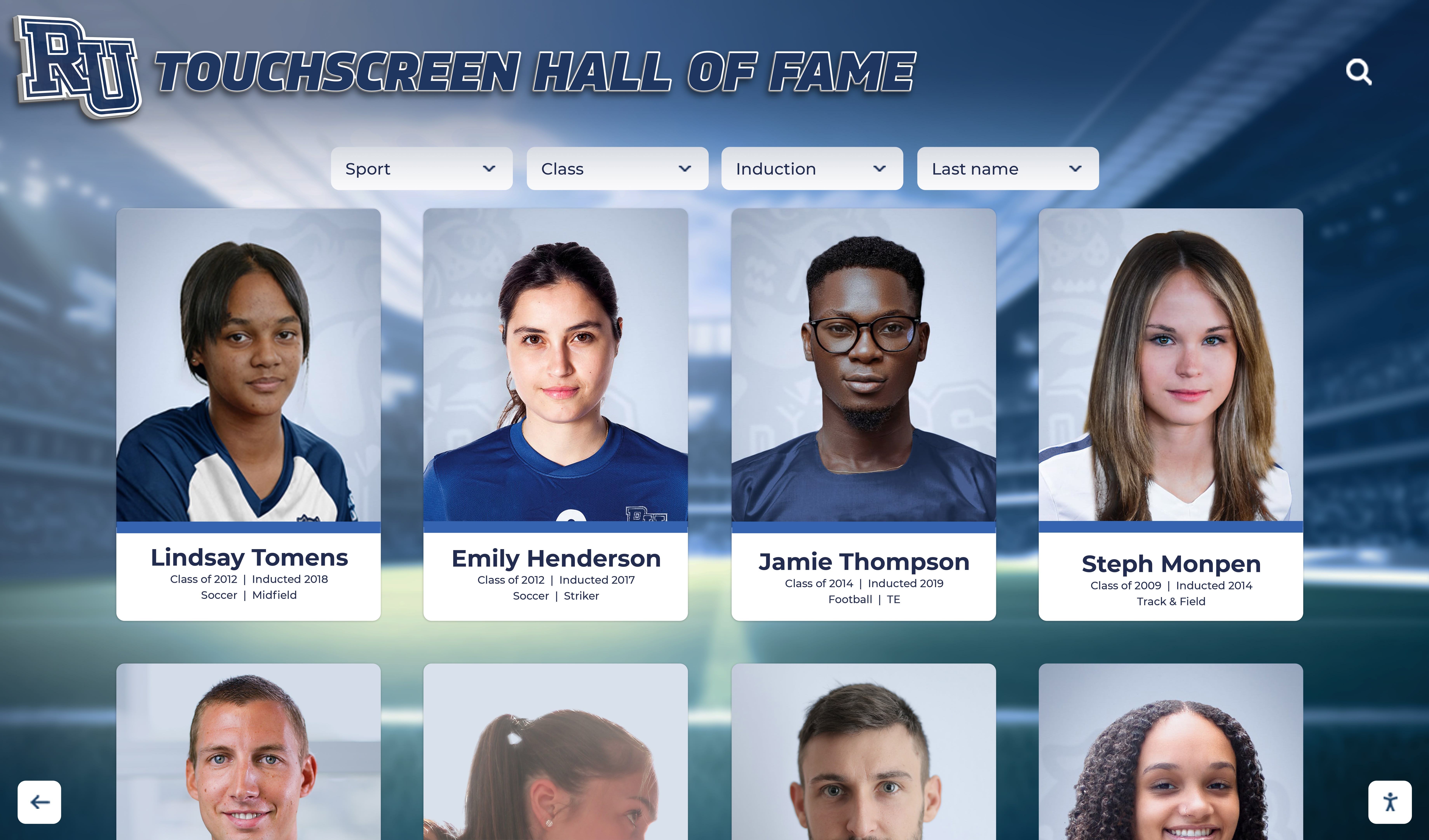
Year-round update workflows depend on CMS access from any location—an athletic director updating spring inductees after a ceremony should not need to drive to campus to publish the change
Best digital signage software options for 2026 includes evaluation of update workflow efficiency across platforms—a practical lens for teams that have experienced the frustration of content becoming stale because updates were too technically demanding to complete routinely.
Comparing Platform Types: A Feature Summary
| Feature | General-Purpose Signage | Purpose-Built Recognition (Rocket Alumni Solutions) |
|---|---|---|
| Athletic record boards | Manual graphic updates | Structured database with auto-ranking |
| Hall of fame inductee profiles | Slides or image galleries | Searchable database with full profiles |
| Game schedules and results | Strong native capability | Integrated with recognition content |
| Sponsor / donor recognition | Rotation slides | Contextual recognition panels |
| CMS for non-technical staff | Varies widely by platform | Designed for athletic administrators |
| QR / mobile access | Available on most platforms | Included with full content parity |
| ADA / WCAG 2.1 AA compliance | Varies; verify documentation | Purpose-built compliance features |
| Content capacity | Slide and media storage limits | Unlimited entries and profiles |
| Year-round update workflows | Manual content refresh | Structured seasonal workflows |
| Historical archive depth | Limited by slide storage | Scalable across decades of data |
Frequently Asked Questions
Can a school use both general-purpose signage and a purpose-built recognition platform simultaneously?
Yes, and many schools do. General-purpose digital signage handles cafeteria announcements, emergency messaging, and event promotions across campus. Purpose-built recognition displays handle athletic halls of fame, record boards, and recognition content in athletic facility lobbies and trophy corridors. The two systems serve different content needs and different audience contexts without competing.
How long does initial data entry take when setting up a purpose-built athletic recognition platform?
Initial setup time depends heavily on how much historical recognition content a school is importing. Programs with well-organized existing records (spreadsheets, athletic archive databases) and photo libraries can typically complete initial data entry in a matter of weeks with designated staff time. Programs digitizing physical records from older print materials—yearbooks, plaques, scanned documents—require more time but gain permanent digital archives as a result.
What hardware is required for touchscreen athletic recognition displays?
Commercial-grade touchscreen displays in 55", 65", 75", or 86" formats are the most common installations for athletic lobbies and hallways. Commercial hardware is rated for continuous daily operation and broader temperature ranges than consumer displays—important for athletic facilities where temperature variation and extended operational hours are standard. Vendors typically recommend specific display brands based on compatibility testing with their software.
Is it possible to display sponsor logos and donor recognition alongside athletic records and inductees?
Purpose-built recognition platforms support integrated sponsor and donor recognition within the same display environment as athletic content. Sponsor panels, naming acknowledgments, and donor recognition tiers can appear in proximity to the athletic content they support, creating recognition context that rotation-based announcement slides cannot replicate.
What happens to recognition content if a school switches platforms in the future?
Verify data portability before signing any contract. Schools should confirm that inductee profiles, record entries, photographs, and historical content can be exported in standard formats (CSV, JSON, or similar) rather than locked in proprietary data structures. Platform portability protects decades of athletic history from becoming inaccessible if vendor relationships change.
Selecting the best digital signage for schools requires a clear-eyed assessment of who will use the displays, what content they need to manage, and whether the platform category matches the recognition use case. General-purpose digital signage platforms serve campus communication needs well—and schools that need primarily announcements, schedules, and wayfinding should evaluate them on those merits.
For athletic recognition—record boards, hall of fame profiles, sponsor panels, and the kind of community engagement that turns a lobby display into a destination—purpose-built platforms are worth evaluating seriously, because the feature gap between retrofitted general signage and software designed specifically for recognition is operational, not cosmetic.
Schools ready to see how purpose-built recognition software addresses the athletic recognition use case can request a demo through Rocket Alumni Solutions—a platform designed for exactly the athletic director, advancement staff, and facilities teams evaluating recognition-specific digital signage needs.